Compare browser-based caption editing workflows
A captioning comparison should end with a file that your receiver can open. Begin with the input and output formats in the delivery schedule, then test how each editor handles the corrections between them.
- 01 · off-screen speaker is identified
- 02 · a sound cue remains intelligible
- 03 · exported timing opens against the same picture master
Follow the revised cue into the delivery file
Ask the same caption editor to resolve three changes in the sample: a proper name, a cue that crosses a cut and a crowded line over a lower third. Note how the editor gets from an issue report to its cue and how they compare the change with the picture. Then ask a second person to review the proposed corrections without reconstructing the whole job. The editor and reviewer may prefer different things about the two applications.
Include a delivery contact in the last pass. Supply the real target format, language and clock from an approved brief. Open each resulting file with the receiver’s usual viewer and compare text, positioning, timing, accents and speaker identification. Record any manual repair necessary after export. If the project also needs a translation or a second frame-rate version, repeat the last step for that artifact. Each derivative should retain its own review record.
Do the editorial decisions survive a round trip?
Choose a scene with an off-screen speaker, meaningful sound and a lower-third graphic. Import a copy of the source captions. Move one break, separate speakers, and make the cue readable over the graphic. Export the required format and open that file in a second viewer. Compare the text, line breaks, event boundaries, placement and characters against the reviewed version.
Choose for the handoff
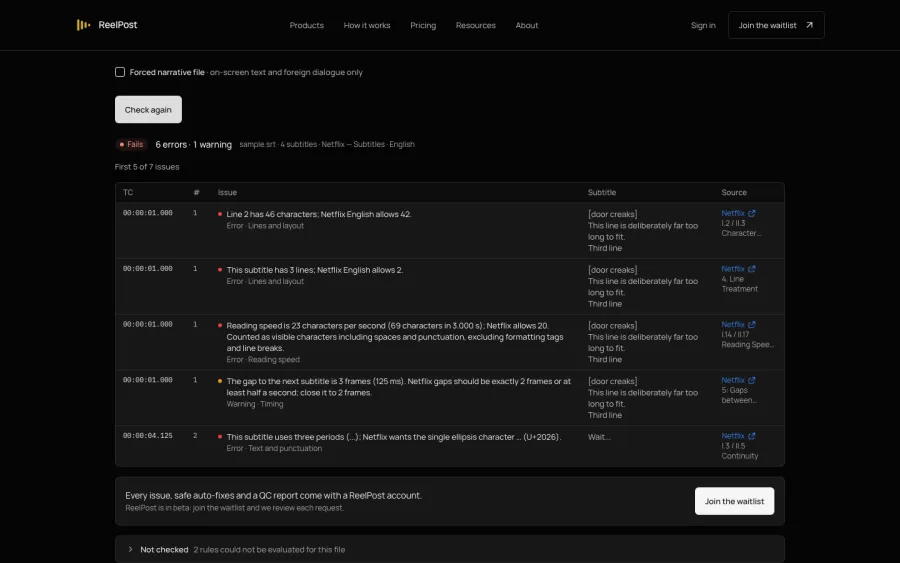
Closed Caption Creator publishes its editing, localization and format capabilities. Compare its actual format support with the version you test. Try ReelPost with a locked-cut transcription, editable cues and the subtitle checker. A familiar editor can be the right choice even when another tool creates a quicker draft.
Run a short production trial
Use a scene you have permission to share. Record its file name, running time, frame rate and revision date. Give each operator the same brief and the same acceptance criteria. Include somebody who receives the finished deliverable in the test. They may need a different export, document layout or way to mark approval than the person who prepares it.
Log setup time separately from review and rework. If one test uses a familiar operator and another starts with a new user, record that difference. Put open questions in the trial notes and ask each vendor to demonstrate the answer on your sample before committing a production.
Make the purchasing decision repeatable
Before the trial, write down three conditions the final workflow has to satisfy. Choose observable outcomes such as reproducing a reviewer’s note on the correct shot, exporting an approved artifact that opens in the receiving system, or recovering a prior revision after a mistaken edit. Name the person who can accept each result. Keep helpful extras in a separate column so a polished demonstration cannot obscure a missing production requirement.
Use the first run to learn the interface and the second to measure the workflow. Make the second change comparable in size to a normal late-stage revision. Count minutes spent preparing input, waiting for processing, checking the output, correcting mistakes and communicating the decision. Label any waiting time that occurred while an operator could do other work. The useful comparison is the cost and timing of your team’s complete handoff.
Record the date, product configuration, plan and any support assistance used for the trial. Confirm current pricing, project limits, retention and export requirements directly with each provider. Write a short decision note covering the tested version, the successful outputs, any unresolved questions and the owner of the next trial. Revisit that note when the next show changes language, volume, review audience or delivery format.
Questions about this resource
Which instructions apply to my particular delivery?
Confirm the destination, title version and deliverable with the receiving team. Use the linked references and worked example to prepare questions before you send a final file.
Can my team see this workflow on a demo?
Join the ReelPost waitlist with your email and reply to the welcome message. A team member can arrange a walkthrough around the deliverable on your schedule.