Prime Video caption requirements for filmmakers
Prime Video describes captions or SDH, subtitles and forced narratives as distinct assets. Decide which experience the customer is meant to have before exporting a file. An English caption track for a US release and an English forced narrative for the same title can legitimately coexist. The manifest and the content of each file should make their roles unambiguous.
- Full English captions: test the announcer’s words, the offscreen whistle and the reaction.
- English forced narrative for the corresponding dub: test the untranslated station sign with full subtitles disabled.
- Verify the package language mapping, then compare the opening and final cues to the delivered mezzanine.
Start with audio and locale
For each audio option, record the language and locale on the playable asset. Next to it, list the full caption or subtitle tracks and any forced narrative requested. Imagine a title with English dialogue, a brief exchange in French and a location card containing essential information. A viewer listening to an English dub with subtitles turned off may still need translated text for the card. A viewer selecting English captions also needs the surrounding dialogue and meaningful sounds.
Consult the current Video Central instructions for the title and territory. The published guide describes the requirement for English captions in the US locale, and explains how forced narrative language and locale need to match the associated audio. A filename such as EN-final tells you little about the relationship. Put the intended asset type and associated audio in the working sheet before authoring starts.
Set the clock from the delivered mezzanine
Play the exact mezzanine that the receiver will ingest. Determine the frame rate, the beginning of program and any leader or slate treatment. For frame-based timed text, Prime Video asks providers to include frame rate and drop/non-drop information in the MMC asset manifest. Clock-based timestamps expressed in milliseconds use a different timing representation. Converting a timestamp between the two without knowing which reference it came from can create a small error at every edit.
Check a cue immediately after the opening, another in the middle and the last spoken line. Note the amount and direction of any displacement. A constant shift of one hour suggests investigating the origin or leader. Sync that starts well and gradually drifts points to a different time-base problem. A jump directly after a replaced shot suggests two cuts were involved. Identify which condition you observe before applying a global offset.
Choose a format the actual delivery accepts
Video Central lists multiple inputs including DFXP/TTML, SCC and SRT. Their expressive capabilities differ. A plain-text subtitle file may omit positioning or speaker presentation that the authoring master retained. Compare the content the viewer needs with the capabilities of the requested output. Keep an editable master so later language corrections do not have to be reconstructed from a delivery copy.
Check how the exported file handles two speakers, accented letters, a music cue and text positioned around an important graphic. Open that file in a decoder or player that reads the exported format. A preview inside the authoring timeline proves the timeline renders. Opening the delivered bytes can reveal a missing character, unsupported style or incorrect track selection.
Review the packaged experience
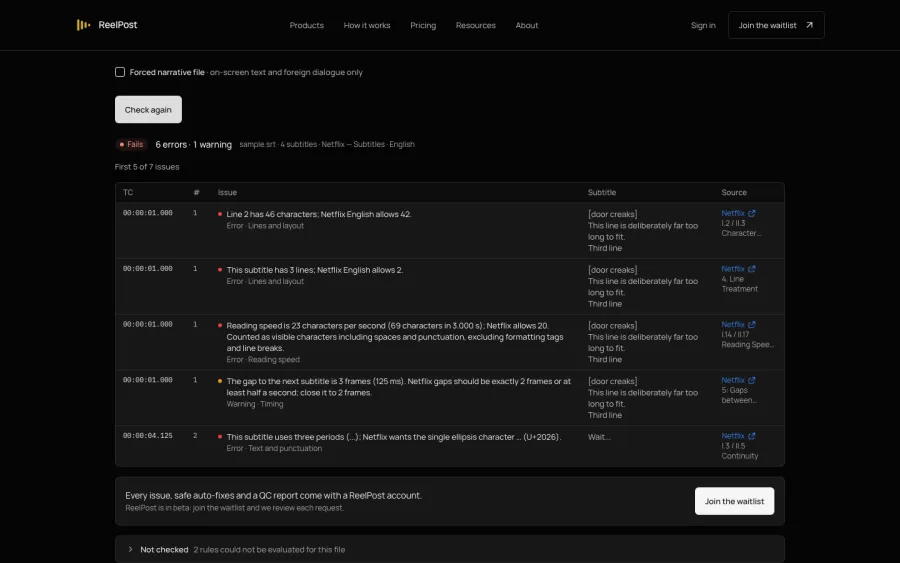
Check the manifest labels, language and asset identifiers against the file you just tested. Ask a reviewer to simulate the audio and subtitle combinations the title actually offers. For a forced narrative, include the subtitle-off case. If a note comes back, keep the old file, affected timecode, accompanying audio and replacement filename together so the receiving team can test the same condition.
In the final check, distinguish a failure that appears in every playback mode from one that appears only with a specific dub selected. The former points toward an asset or timing issue. The latter gives the receiving coordinator a reason to inspect the association between language, audio and the forced narrative. Preserve that combination in the QC note along with the timecode.
Questions about this resource
Which instructions apply to my particular delivery?
Confirm the destination, title version and deliverable with the receiving team. Use the linked references and worked example to prepare questions before you send a final file.
Can my team see this workflow on a demo?
Join the ReelPost waitlist with your email and reply to the welcome message. A team member can arrange a walkthrough around the deliverable on your schedule.