How to check Netflix subtitle requirements
A subtitle can fit a character limit and still be difficult to read. Test each event for time on screen, line length, reading speed and its relationship to the cut. Treat the export format as a separate delivery decision. This worked example uses Netflix’s published general and English (USA) guides; another language or project brief can require different choices.
- Cue 118, master at 24 fps, duration 36 frames. The export shows 36 displayed characters.
- At 1.5 seconds the event reads at 24 characters per second. The next speaker enters immediately.
- Review wording against the audio, then check cue 119 and the cut in playback.
Convert duration into a recognizable unit
The general guide gives an event a minimum of five-sixths of a second and a maximum of seven seconds. At exactly 24 frames per second, the minimum is 20 frames and seven seconds is 168 frames. Keep the source frame rate attached to your notes. A count of 20 frames means a different duration at 30 frames per second. Before trimming a one-frame failure, check how the editor defines an out-point. One program may show the last visible frame while another stores the first frame after the event.
Check the events on both sides of a change. Extending a short response can close the gap before the next speaker. Moving it earlier can reveal the answer before the question has finished. The timing guide discusses audio cues and shot changes. Scrub through the relevant frames and then watch at normal speed before choosing the fix.
Balance the line and the reading time
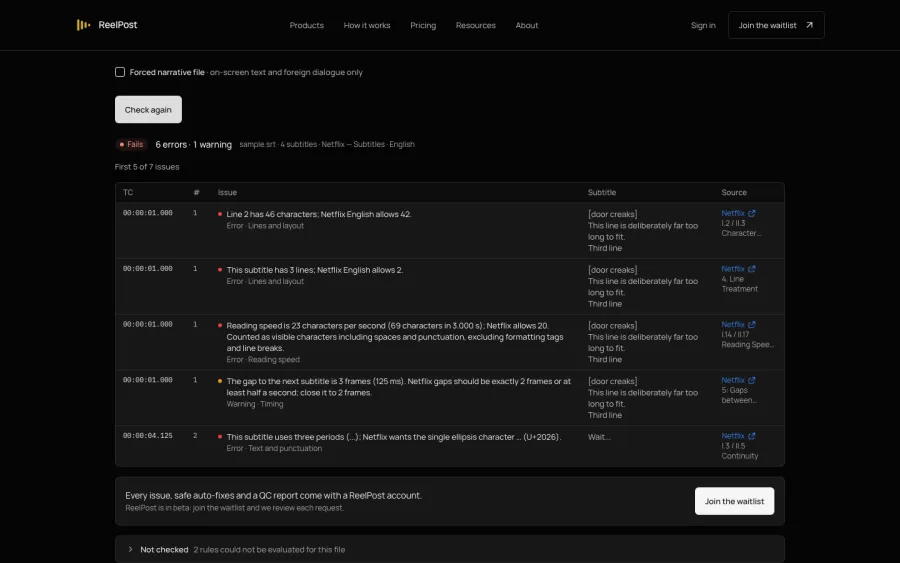
In the US English guide, a line can contain up to 42 characters. The general guide limits an event to two lines. For US English, the reading speed limits are 20 characters per second for adults and 17 for children. Under a counting convention in which the displayed text contains 36 characters, a two-second event reads at 18 characters per second. The same event lasting 1.5 seconds reads at 24. Redistributing those characters between two lines does nothing to change the time available.
Start with the dialogue and the actual onset of the next line. If more time is available, test a longer duration. If the actor runs directly into the next sentence, examine the wording under the applicable language and track rules. A translator may have room to choose a shorter expression with the same sense. An SDH editor working from finished English audio has to account for what the actor actually said. Recalculate after the editorial change.
Separate timing failures from file failures
A file that opens in a desktop player can still contain an unexpected time base or a character the receiving system cannot display. Keep the authoring project, export and video reference together until ingestion is complete. Check the spec for the exact accepted output before converting a client’s SCC or SRT. Netflix’s public general guide directs partners to their current delivery documentation for file formats. A tool’s ability to read an input is useful for review and says little about which output the buyer ordered.
Review the first spoken phrase, a mid-program phrase and the final phrase against the delivered picture. A constant displacement suggests investigating the start offset. An error that grows over the film suggests checking the time base or a speed conversion. A sudden change after one scene points toward a version or edit difference. Use those observations to narrow the investigation before shifting an entire file.
When documenting a failure, include the counted characters, the displayed duration and the relevant rule for that audience. Someone reviewing a spreadsheet of cue numbers otherwise has to recreate the whole test. If your counting tool excludes formatting tags or treats line breaks differently from another editor, record that convention and compare the visible text in one representative cue before editing the rest.
Questions about this resource
Which instructions apply to my particular delivery?
Confirm the destination, title version and deliverable with the receiving team. Use the linked references and worked example to prepare questions before you send a final file.
Can my team see this workflow on a demo?
Join the ReelPost waitlist with your email and reply to the welcome message. A team member can arrange a walkthrough around the deliverable on your schedule.