The Netflix timed text style guide, explained
A Netflix subtitle job starts with three decisions. Which version of the picture are you timing to? Which language and audience are you writing for? What kind of track did the buyer request? Write those answers on the job sheet before opening a subtitle editor. They determine which parts of the Netflix Partner Help Center apply and what a useful first review should test.
- Picture: Station Cut 07, 24 fps. Audio: original English stereo.
- Deliverable: English (US) SDH. Verify the unheard dispatcher’s identity at the reveal.
- Review at the platform insert: the platform number and subtitle must both remain readable.
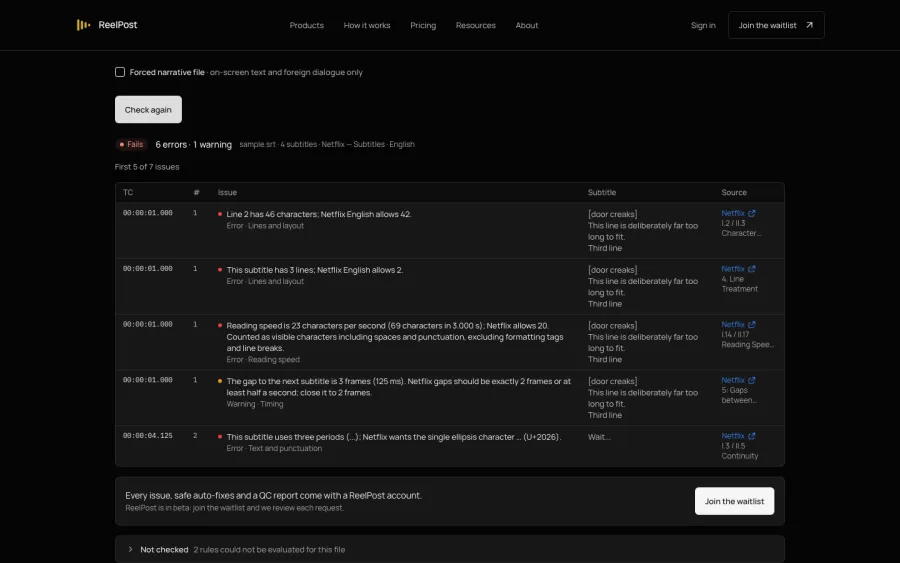
Assemble the brief for one track
Take the title, episode, language and asset type from the source request. Record the frame rate and start position of the reference master, then play its first and last recognizable lines against the accompanying audio. An editor can spend a day polishing a track that was authored against the international cut and still miss the extra dialogue in the domestic version. A small version identifier beside the filename can save that day.
Keep three references open. The general guide covers principles shared across languages. The timing guide explains relationships between speech, cuts and the appearance of text. The language guide supplies spelling, punctuation, reading speed and conventions for that audience. If the asset is a trailer or supplemental, check whether its request supplies additional instructions. Record which guides you used alongside your first completed pass.
Decide what belongs on screen
Consider a scene in which a woman reads a platform number from an overhead sign while a station announcement plays. Listen once, then play the shot with the sound down. List what the intended viewer needs to understand. A translated subtitle may need the platform number. An English SDH track may need to identify the announcement as a voice over the loudspeaker. Make separate editorial decisions for the two files, even where they contain the same sentence.
Write names from approved credits or character lists. Check which names the story has revealed by that point. A label that identifies the masked caller in the opening scene can spoil the reveal. Where two speakers share a subtitle, check that a reader can follow the exchange without guessing which line belongs to whom.
Give text a natural shape
Break a long sentence where a reader can take a breath and retain its meaning. In “She put the spare key under the blue flowerpot,” keeping “the blue flowerpot” together helps the eye arrive at the object in one movement. If that break overflows the line, try a different division or examine whether the time available supports two successive events. Read both cues at playback speed. A tidy rectangle on the editor’s canvas can still leave the viewer waiting for the end of a thought.
Review punctuation and italics in context. A phone voice, a voice physically off screen in the same room and a narrator can sound equally distant on headphones. Their roles in the scene differ. Use the treatment specified for the language and asset, and apply the same judgment consistently across the episode.
Hand off evidence a reviewer can use
Export a short test covering an interrupted line, on-screen text, a cut and a two-speaker exchange. Open the exported file with the actual picture and look for changes in placement, line breaks or character encoding. Compare the exported last cue with the one in the project. Record any open questions with timecode and a short description of what the reviewer should decide. That gives the next person a precise piece of the scene to watch.
Give the receiving editor a decision log for exceptions. One entry might identify the approved spelling of the station, another a lyric that the music supervisor verified from the credits. Keep each entry short enough to use while scrubbing the picture. A later episode can then inherit a deliberate language choice without repeating an investigation or accidentally carrying over an error.
Questions about this resource
Which instructions apply to my particular delivery?
Confirm the destination, title version and deliverable with the receiving team. Use the linked references and worked example to prepare questions before you send a final file.
Can my team see this workflow on a demo?
Join the ReelPost waitlist with your email and reply to the welcome message. A team member can arrange a walkthrough around the deliverable on your schedule.