Compare review tools for a finishing team
Choose a review room by trying to resolve a real note on the right cut. A producer who watches a screener on a phone and an editor who has to reproduce the note in the timeline have different jobs.
- Cut A · reviewer marks 00:00:18:07
- Cut B · six frames removed before this shot
- Decision · resolve on Cut A, verify against Cut B
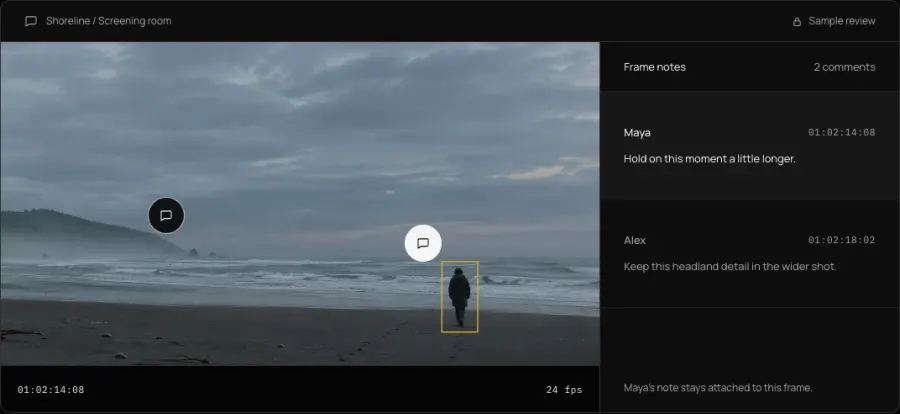
Trace a note from the guest to the timeline
Have a producer open the link using the exact device they expect to take on location. Ask them to scrub to a specified shot, pause, write a note and return to it after closing the browser. Have the assistant editor locate that note on the work sequence. Record the version identifier, the frame label and whether opening the note returns the editor to the expected picture. A short screen recording of this exercise makes the decision easy to revisit.
Run a second exercise with an external reviewer and a sensitive rough cut substitute. Try the agreed sharing and download settings on a harmless sample. End the review and confirm the recipient’s access changes as intended. Invite the person who handles media security to observe. Their acceptance criteria may include who can grant access, how revocation works and what record the production keeps of the material it distributed.
Can the editor find exactly what the producer saw?
Share a short cut with a spoken line that begins just before a picture edit. Ask the reviewer to mark the consonant, leave a note about the cut, and identify which version they watched. Open their note on the edit system and check the frame. Then upload a second cut with a different head. See how easily the editor can distinguish an old note from a current one.
Choose for the handoff
Frame.io offers review and collaboration for media teams. Test the integrations your editors already use. Try ReelPost’s screening room alongside a finishing task when the same review needs to inform captions, a continuity document or credits. For unreleased material, test the actual guest access experience and the access controls your production requires.
Run a short production trial
Use a scene you have permission to share. Record its file name, running time, frame rate and revision date. Give each operator the same brief and the same acceptance criteria. Include somebody who receives the finished deliverable in the test. They may need a different export, document layout or way to mark approval than the person who prepares it.
Log setup time separately from review and rework. If one test uses a familiar operator and another starts with a new user, record that difference. Put open questions in the trial notes and ask each vendor to demonstrate the answer on your sample before committing a production.
Make the purchasing decision repeatable
Before the trial, write down three conditions the final workflow has to satisfy. Choose observable outcomes such as reproducing a reviewer’s note on the correct shot, exporting an approved artifact that opens in the receiving system, or recovering a prior revision after a mistaken edit. Name the person who can accept each result. Keep helpful extras in a separate column so a polished demonstration cannot obscure a missing production requirement.
Use the first run to learn the interface and the second to measure the workflow. Make the second change comparable in size to a normal late-stage revision. Count minutes spent preparing input, waiting for processing, checking the output, correcting mistakes and communicating the decision. Label any waiting time that occurred while an operator could do other work. The useful comparison is the cost and timing of your team’s complete handoff.
Record the date, product configuration, plan and any support assistance used for the trial. Confirm current pricing, project limits, retention and export requirements directly with each provider. Write a short decision note covering the tested version, the successful outputs, any unresolved questions and the owner of the next trial. Revisit that note when the next show changes language, volume, review audience or delivery format.
Questions about this resource
Which instructions apply to my particular delivery?
Confirm the destination, title version and deliverable with the receiving team. Use the linked references and worked example to prepare questions before you send a final file.
Can my team see this workflow on a demo?
Join the ReelPost waitlist with your email and reply to the welcome message. A team member can arrange a walkthrough around the deliverable on your schedule.