Secure screeners your team can comment on
A screener is useful when the intended viewer can open the right version and the editor can act on the notes. Choose access settings for the audience, then test with the same kind of device and account a guest will use.
- Cut · Station v03
- 00:02:16:04 · “Hold through the last syllable before cutting to the platform.”
- Decision · producer approves change in v04.
Prepare the review copy
Label the version clearly and agree on which changes are in scope. If the review file has a leader or a different first-frame timecode from the online master, include the offset in the handoff. A note at 00:10 on a screener should lead the assistant editor to the same picture.
Verify guest access
Use a recipient-controlled account or a clean browser session. Verify that the expected person can view the cut and that a restricted or revoked link behaves as intended. Establish whether downloads are appropriate before sending anything outside the production team.
Close the review
Ask for one actionable observation per comment. Relate it to a frame, a spoken line or an identifiable action. When the cut changes, keep notes attached to the version they describe and mark the outcome against the next review copy. Revisit access when the review window ends.
Define the invitation before distributing the cut
Identify the intended audience first. A producer collecting picture notes, a sound mixer checking a replacement line and a distributor evaluating a locked master each needs different context. Give the review a clear purpose, deadline and version label. Share a substitute clip for the access test, then use the production’s approved process for the real material. Ask the responsible coordinator which viewing and download settings the agreement requires.
Open the invitation from a clean browser session and check the complete route from message to playback. Try the device, browser and network conditions a real reviewer will use. If a reviewer cannot start playback, distinguish an invitation problem from an unsupported file or slow connection. Write down who can correct access for the recipient during the review window.
Turn a viewing session into a decision
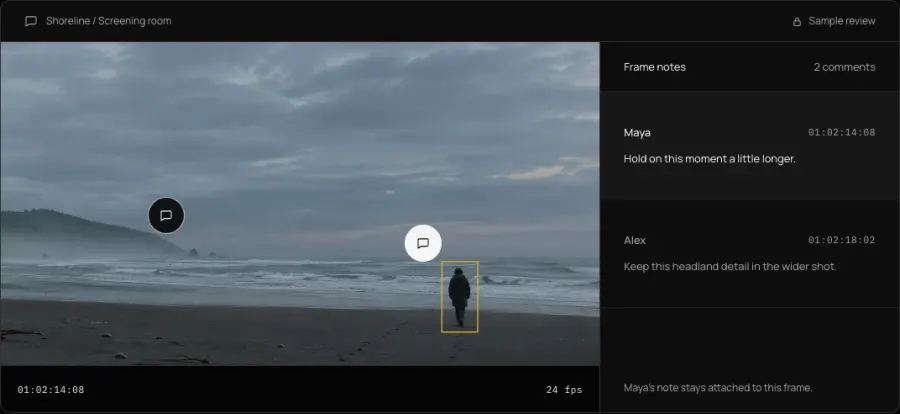
Ask a reviewer to leave one precise note on a line of dialogue and another at a picture edit. Reopen both notes from the editor’s workstation. Confirm the first lands on the intended syllable and the second brings up the right cut. If the timecode starts at a different origin in the review copy, include the relationship to the finishing timeline in the review brief.
When the next version arrives, preserve the earlier review context. Identify which changes addressed approved notes and which new decisions still need the producer. Play through the revised section and the adjoining cut before closing a note. At the end of the review, check that the coordinator can revoke or change guest access when required and that the accepted version can be identified from the handoff record. Give the editor a dated decision note and the filename of the approved master.
Prepare a handoff someone else can verify
Ask the recipient to open the actual file or link before the delivery window closes. Provide the picture identifier, version date and start timecode in the handoff. Choose a recognizable moment near the beginning and a second one near the end. A recipient who can locate both moments has a quick way to verify the correct master and detect a drifting time reference.
Keep the original request, the reviewed artifact and the acceptance note together. If the recipient asks for a change, identify the affected shot or speaker turn and describe the requested result in plain language. Issue a new revision, then check a passage before the change and another after it. This practice makes it easier to resolve a question when the editor or coordinator who prepared the first version is working on another show.
Questions about this resource
Which instructions apply to my particular delivery?
Confirm the destination, title version and deliverable with the receiving team. Use the linked references and worked example to prepare questions before you send a final file.
Can my team see this workflow on a demo?
Join the ReelPost waitlist with your email and reply to the welcome message. A team member can arrange a walkthrough around the deliverable on your schedule.