Free music cue sheet generator from an EDL or XML
Export the music tracks as a CMX 3600 audio EDL or Final Cut Pro 7 XML. The browser creates a CSV using the edits’ record in/out points and durations.
Open this tool with JavaScript enabled to work on your files locally.
- An audio edit runs from 01:02:10:00 to 01:02:16:12 at 24 fps.
- The sheet reports 6.500 seconds. Fill in the credited composition and publisher from the music log.
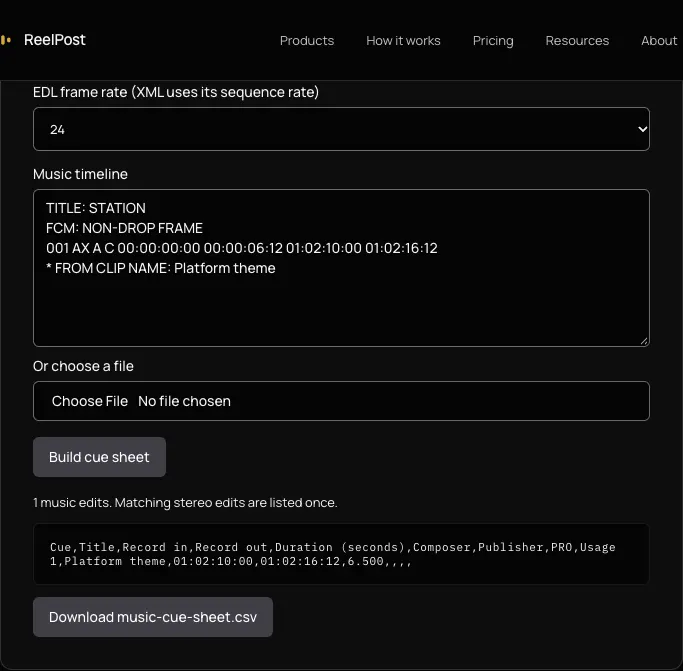
Complete the rights information separately
Select only the music tracks when exporting. Timeline clip names are starting points for identifying works. Check title, composer, publisher, performing rights organization and usage against the music log or license.
Choose the timeline rate for an EDL. Final Cut Pro 7 XML carries its sequence rate. Duplicate stereo edits with the same name, in and out appear once.
Isolate the material that belongs on the sheet
Duplicate the locked sequence and isolate the music tracks. Remove production sound, temporary sound effects and dialogue from the exported audio edit list. A filename can look like a song title even when the clip is an effect. Check a short sample of clips against the actual use in picture before relying on a track name or the organization of the timeline.
For CMX audio EDLs, preserve the record timecodes and include clip-name comments when the editor supports them. The reel identifier alone may be a generic label. For Final Cut Pro 7 XML, export a single sequence. The sequence timebase and start frame let the tool translate clip positions into record labels. A newer FCPXML file is a different XML structure; choose an interchange export this tool can read.
Verify the durations against music use
Find one isolated cue and check its first and last audible moments in the master. The edit list describes the clip boundaries, while a fade, silence at the head, or an edit inside a longer music file can change how the use is ultimately reported. For repeated appearances of the same composition, keep the separate time windows until the responsible music coordinator decides how the final sheet should group them.
Matching stereo channel edits are combined only when the title and both timeline boundaries match. Two layers with different names remain separate. If the export contains a transition with unresolved boundary frames, resolve its timing in the edit system and export again. Do not guess the midpoint of a crossfade and enter it as an approved cue boundary.
Reconcile the CSV with the music log
Open the downloaded sheet and compare each clip label with the licensed composition. Fill the composer, publisher, performing rights organization and usage fields from the relevant documentation. Check instrumentals, reprises and alternate mixes for naming differences. Keep the original timeline export attached to the project record, and ask the responsible music supervisor to sign off on the final reporting version.
Read the clock on the source
Before doing any arithmetic, read the frame rate from the actual sequence settings. Write down both the rate and the counting convention. A filename ending in “24” might describe 24.000 or 23.976. Those rates are close enough for a short test to look right and different enough for an hour-long programme to reveal an error. If a delivery sheet names a different rate, identify which version of the picture that instruction applies to.
Treat the timecode origin as a separate setting. A timeline can begin at one hour while the media player shows zero at the same first frame. Keep the difference explicit whenever you move between frame-labelled cuts and elapsed times. Compare a known edit point and the final frame before applying the results to a whole reel.
Record the version you reviewed
Save a copy with the programme name and picture version in its filename. If the producer later sends a revised cut, keep the first review and start a new version from the revised source. An edit near the beginning can change every downstream timecode even when the total running time barely changes. Write down the frame rate and the first picture frame used for comparison.
For the handoff, identify who prepared the file, who checked it and which items still require a decision. Include the actual deliverable and the source used to build it. A person opening the folder a month later should be able to tell which artifact was for review and which one was approved for delivery, without relying on the upload date.
Questions about this resource
Where are my files processed?
The public tool runs in your browser. Save the result before closing the tab. Your source file stays on your device.
Can my team see this workflow on a demo?
Join the ReelPost waitlist with your email and reply to the welcome message. A team member can arrange a walkthrough around the deliverable on your schedule.