Build a CCSL from your locked cut
Build a combined continuity and spotting list from the version of the film you intend to deliver. ReelPost brings picture descriptions and dialogue into one timecoded document that a post supervisor can review against the cut.
- 01:00:12:00–01:00:14:00 · Mira folds the station map.
- MIRA · “Platform three.”
- Review note · establish whether the announcement underneath is intelligible.
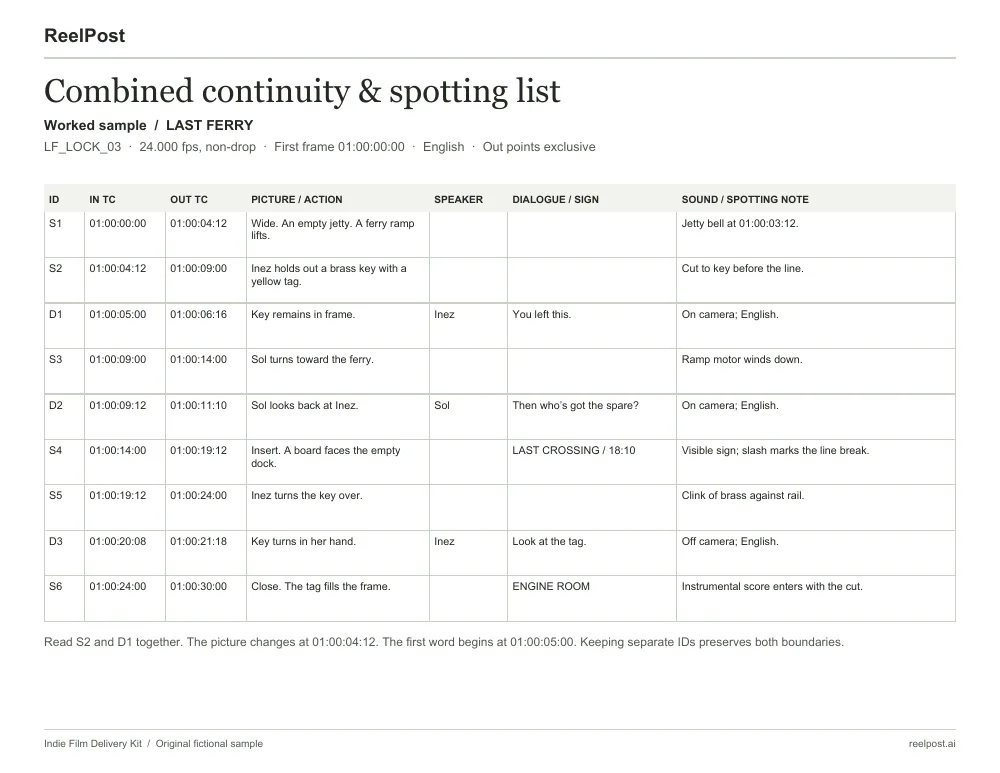
Start from a named master
Get the exact cut, its start timecode, frame rate and the recipient’s sample document. Establish whether the listed end of a shot means its last visible frame or the next cut. Supply a cast list and preferred spellings of places and organizations. A transcript alone cannot identify a silent action or a title card.
Review the picture and words together
Work shot by shot. Check who is visible, who is speaking off screen and what appears in on-screen text. Keep a description factual when the shot leaves room for interpretation. Flag a proper noun for the producer instead of accepting a plausible transcription. Use the same timecode base throughout.
Handle a revised cut
Keep the version used to produce the first document. If a scene moves or a shot is shortened, compare the affected passage and the downstream timecodes against the new master. A line of dialogue can remain word-for-word correct and still point a translator at the wrong shot. Export the reviewed PDF and identify its picture revision in the handoff.
Brief the operator with an actual scene
A continuity description should give the next reader enough information to identify what happens on screen. Use a short scene to settle how detailed the descriptions should be. Consider a station scene with an insert of a timetable, an announcement over the loudspeaker and a passenger reacting before the train arrives. Ask the recipient whether the text on the insert needs to be transcribed and how background voices should appear. Their example document is the best place to resolve a formatting question.
Mark the beginning and end of each shot against the picture. Listen through each cut; speech often starts before the speaker is visible or continues over a reaction. Treat those as separate observations about picture and sound. Preserve the speaker’s actual words alongside the relevant timecodes. If the production uses a canonical spelling that differs from the draft transcription, reconcile the name with the approved list.
Review the hardest material before building the rest
Choose a montage, a conversation with overlapping speech and a shot containing an important written message. Review these three passages first. They reveal whether the document model and the recipient’s brief agree about cut points, speaker attribution and on-screen text. Record the accepted convention once, then apply it through the rest of the reel.
Check the final export as a document. Look at a page break cutting through a long passage, a scene with a crowded description and a heading following an edit. Verify that both timecodes remain attached to the correct material and that a translator can follow the line without switching back to the source project. Retain a separate list of unresolved questions with owners, rather than silently filling a gap in the picture description.
Prepare a handoff someone else can verify
Ask the recipient to open the actual file or link before the delivery window closes. Provide the picture identifier, version date and start timecode in the handoff. Choose a recognizable moment near the beginning and a second one near the end. A recipient who can locate both moments has a quick way to verify the correct master and detect a drifting time reference.
Keep the original request, the reviewed artifact and the acceptance note together. If the recipient asks for a change, identify the affected shot or speaker turn and describe the requested result in plain language. Issue a new revision, then check a passage before the change and another after it. This practice makes it easier to resolve a question when the editor or coordinator who prepared the first version is working on another show.
Questions about this resource
Which instructions apply to my particular delivery?
Confirm the destination, title version and deliverable with the receiving team. Use the linked references and worked example to prepare questions before you send a final file.
Can my team see this workflow on a demo?
Join the ReelPost waitlist with your email and reply to the welcome message. A team member can arrange a walkthrough around the deliverable on your schedule.