Continuity script template with a worked example
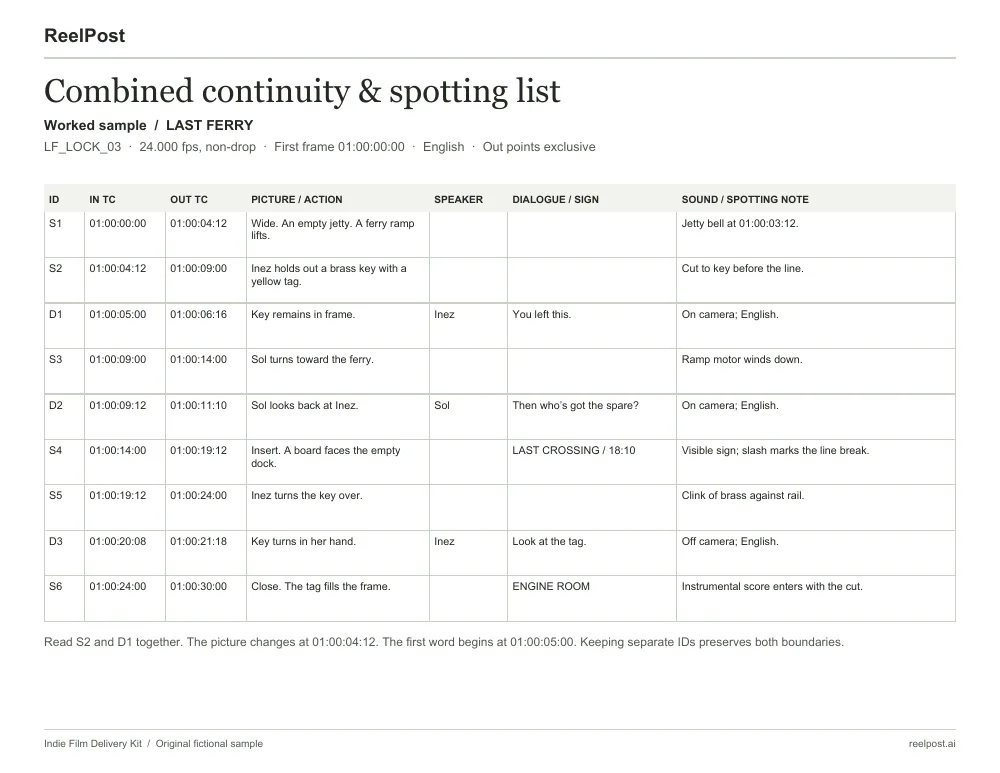
A post-production continuity script describes the sequence that actually plays. It gives a reader the visual action, visible lettering and useful audio cues for each shot. The editable sheet follows a thirty-second dock scene through six cuts. Use it to build a record a localization supervisor can navigate with the same timecoded master.
- S4 · 01:00:14:00–01:00:19:12 · Insert, departure board.
- Picture · A board faces the empty dock.
- Visible text · LAST CROSSING / 18:10. Audio · Distant water.
Establish the reference and shot numbering
Stamp the reference ID, frame rate and start timecode on the worksheet. Find an unmistakable frame near the start and another near the end. Note whether a leader or slate is included. A client watching the reference online may see elapsed player time while you see sequence timecode, so explain the offset in the handoff.
Assign a short ID to each pictured shot. With a straight cut the last frame of one shot and the first of the next are easy to distinguish. For dissolves, wipes and superimpositions, agree which point your client wants marked. A transition can occupy multiple frames. Use a note to explain the visual change if a single boundary would be misleading.
Write what changes on screen
A useful row names the subject, the action and the detail that makes the shot recognizable. In S2, Inez holds out a brass key with a yellow tag. That wording lets a reader identify the object immediately when it returns. “She looks worried” adds an interpretation. If the expression matters, record the visible action that prompted the interpretation.
Use framing and location sparingly. A wide view establishing the empty dock and an insert of the departure board serve different functions. When the story cuts back to an earlier place, reuse the established name for it. Save new labels for genuinely different locations, characters or objects.
Separate words in the picture from the soundtrack
Record signs, titles, date cards and writing on props in a dedicated field. Preserve the wording and line order where the layout has meaning. A visual description of the board and a transcription of its letters answer two different questions. In this sample a translator can find “18:10” without searching a paragraph of camera direction.
The audio column can identify a speaking character, a significant entrance or a transition that continues over the cut. Link to full dialogue cues when a separate dialogue list is available. A continuity row can span two turns of dialogue, so avoid squeezing a detailed transcript into a single unreadable cell. Ask the receiver whether it needs line-level timecodes as well.
Revise after a picture change
Suppose the departure-board insert gains twelve frames. The word on the board still reads the same, but the next cut and subsequent events may move. Mark the revised shot and check following timecodes against the new master. A global shift can correct simple offsets while missing an internal trim or a shot replacement. Recheck at each edit boundary in the revised section.
Have a reviewer match one row per scene to picture with sound muted, then listen again to any disputed moments. Keep the revision ID visible in the filename, sheet header and exported PDF. Send a short change note naming the shots that moved so the receiving team can update only the affected work.
Print a page at the delivery size and check the longest action and visible-text columns. Row expansion in Excel can leave the final words outside the printed area. Check the PDF that accompanies the spreadsheet independently. A complete editable cell is little help to a reviewer working from a clipped page sent for approval.
Questions about this resource
Can I adapt the template to my delivery schedule?
Yes. Work from a copy, replace the sample material and match the column names, timecode conventions and file format to your recipient’s written brief.
Can my team see this workflow on a demo?
Join the ReelPost waitlist with your email and reply to the welcome message. A team member can arrange a walkthrough around the deliverable on your schedule.