A CCSL template and worked sample
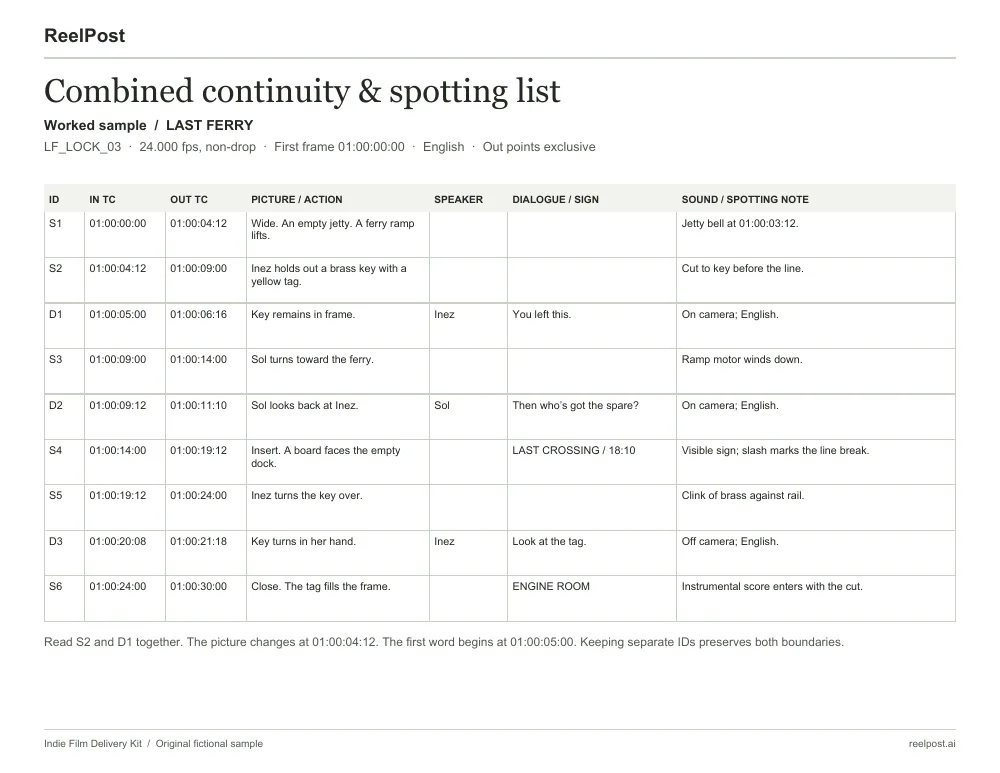
A combined continuity and spotting list lets a distributor, translator or accessibility team find the same piece of picture, speech or writing you saw in the edit suite. The workbook and printable sheets below follow thirty seconds of Last Ferry, an original fictional scene. Use the filled example to see how a line of dialogue sits inside a longer shot. Start your delivery in the blank sheet.
- Editable CCSL and worked example (Excel)
- Filled CCSL sample (PDF)
- Blank printable CCSL (PDF)
- Indie Film Delivery Kit (ZIP)
- S2 · 01:00:04:12–01:00:09:00 · Inez offers the key.
- D1 · 01:00:05:00–01:00:06:16 · Inez says “You left this.”
- At 24 fps the line occupies 40 frames. The shot began 12 frames before the line.
Identify the exact master
Put the filename or version ID, running time, starting timecode, language and frame rate at the top of the sheet. Find the first picture frame in your actual export. A one-hour start on a burn-in and a zero start on a media player can describe the same instant. Give the reader the convention they will see on their reference copy.
Our sample uses LF_LOCK_03 at 24.000 frames per second, non-drop, beginning at 01:00:00:00. Every out time marks the first frame outside the event. The recipient may use an inclusive last frame, film footage measurements or its own workbook. Confirm these decisions before committing a feature’s worth of rows.
Spot the picture and the speech independently
Make a first pass for shot boundaries and give the shots stable IDs. Include the visual detail someone would need to identify the cut. In Last Ferry the camera sees a key at 01:00:04:12. Inez starts speaking twelve frames later. One row records the visual cut and another records her line. A reader can now locate the key reveal without mistaking its timecode for the start of dialogue.
Listen through each shot using the mix the audience will hear. Identify the speaker, preserve the spoken wording, and mark off-camera dialogue when it matters. Give overlapping lines separate rows. When a word is unclear, add a review note and a precise location. A person checking that word can then go straight to the relevant few frames.
Give signs, titles and sounds their own context
At 01:00:14:00 a departure board reads “LAST CROSSING” above “18:10”. The sample records both lines and explains how it represents the line break. A translator can distinguish lettering on a prop from a phrase Sol has spoken. Preserve spelling, case and numbers when those details carry story information.
Record sounds that the commissioned deliverable asks for. In the dock scene a bell and a ramp motor help identify its location. A sound note can explain why speech is hard to hear or why a soundtrack transition matters. Listen to the scene once with the picture hidden to catch events you overlooked while watching the cuts.
Reconcile the sheets before delivery
Compare the first shot, the final shot and at least one event after each reel change with the reference export. Check that adjacent shot boundaries meet under the declared out-point convention. Dialogue and sound rows can overlap picture rows intentionally. A gap in the shot list has a different meaning and deserves an explanation.
Ask another editor to find three events using only the file you intend to send. Have them read the first spoken line, locate a visible sign and identify the sound under the last cut. Their questions reveal ambiguous labels faster than another typography pass. Save both the editable file and the review PDF with the same reference revision.
Check a one-frame boundary by opening the supplied PDF beside the picture. Move the playhead to the frame immediately before each listed cut, then advance exactly once. The incoming shot should match the following description. If your player lands a frame early on every cut, reconcile its display convention with the sheet before correcting individual entries.
Questions about this resource
Can I adapt the template to my delivery schedule?
Yes. Work from a copy, replace the sample material and match the column names, timecode conventions and file format to your recipient’s written brief.
Can my team see this workflow on a demo?
Join the ReelPost waitlist with your email and reply to the welcome message. A team member can arrange a walkthrough around the deliverable on your schedule.