Dialogue lists generated from picture
A dialogue list records the words in the finished film, who says them and where they occur. It gives translators, distributors and post teams a common reference when the shooting script no longer matches the edit.
- 01:00:12:08 · MIRA · “Platform three.”
- 01:00:13:18 · SAM (off screen) · “I have the tickets.”
- Picture reference · Station scene, locked cut v03, 24 fps.
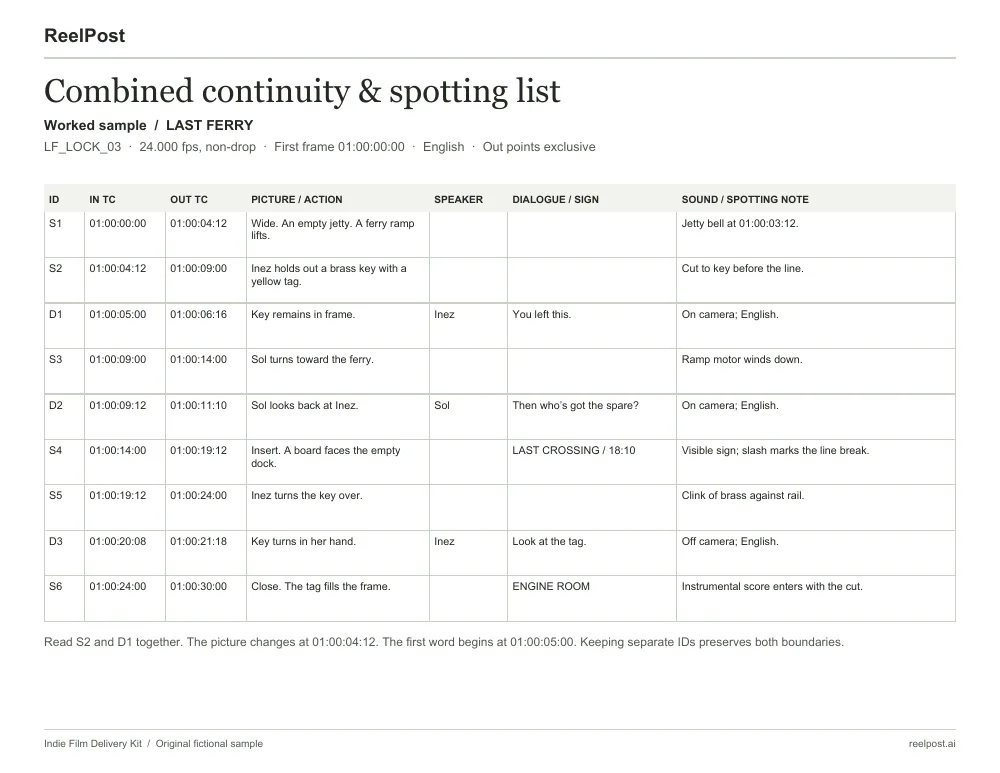
Agree on the fields before transcription
Ask whether the recipient wants a start time only or an in and out, whether background dialogue is included, and how to identify off-screen speech. Request the approved character names. Record the language spoken and supply a translation only when the brief calls for one.
Build from what the audience hears
Review dialogue against the locked master. A character can interrupt, repeat a word or say a different line from the script. Preserve the spoken line under the recipient’s conventions. Use a stable marker for an unresolved word and assign it to someone who can verify the recording.
Deliver a traceable document
Put the cut identifier, frame rate and start timecode near the top. Keep each speaker turn identifiable. Check the first and last entry, an overlap and a passage following a picture change. If the team also needs visual continuity, link the dialogue to the corresponding CCSL rather than duplicating timing decisions manually.
Separate speaker turns from shooting-script lines
Start with the finished audio and a copy of the approved script for reference. Listen to a conversation with interruptions, false starts and off-screen speech. Mark the actual speaker changes and compare the spoken names with the production’s preferred spellings. If an actor improvises a shorter line, use the words in the approved cut under the transcription conventions the recipient requested.
Agree on how to label an unidentified voice. Give the same recurring person a consistent temporary identifier while the producer resolves the name. A background announcement heard through a speaker may need its own row even though no character is visible. If the recipient wants translation notes for a switch in language, distinguish the spoken words from any translation supplied by a qualified reviewer.
Test the list with the person who will use it
Give a translator a short excerpt and ask them to find it in the picture without assistance. Include a line repeated later in the scene, an overlapping reply and a line beginning over a reaction shot. The translator should be able to locate all three by their time references and speaker labels. Record any convention that made the search ambiguous before the full document is prepared.
For a revised soundtrack, identify whether the change affects words, speaker identity, timing or all three. A replacement line of ADR can alter an approved transcription while the picture edit stays exactly the same. Check the final mix against the revised rows, update the version identifier and preserve the prior file. If a later delivery also needs visual continuity notes, reconcile timecodes across documents using the same picture master.
Prepare a handoff someone else can verify
Ask the recipient to open the actual file or link before the delivery window closes. Provide the picture identifier, version date and start timecode in the handoff. Choose a recognizable moment near the beginning and a second one near the end. A recipient who can locate both moments has a quick way to verify the correct master and detect a drifting time reference.
Keep the original request, the reviewed artifact and the acceptance note together. If the recipient asks for a change, identify the affected shot or speaker turn and describe the requested result in plain language. Issue a new revision, then check a passage before the change and another after it. This practice makes it easier to resolve a question when the editor or coordinator who prepared the first version is working on another show.
Questions about this resource
Which instructions apply to my particular delivery?
Confirm the destination, title version and deliverable with the receiving team. Use the linked references and worked example to prepare questions before you send a final file.
Can my team see this workflow on a demo?
Join the ReelPost waitlist with your email and reply to the welcome message. A team member can arrange a walkthrough around the deliverable on your schedule.