What is a CCSL?
A combined continuity and spotting list, usually abbreviated CCSL, is a timecoded record of the finished picture and its dialogue. One document ties what happens on screen to who speaks and when. A localization editor can find a line, see the action that gives it meaning and locate it in the master. A distributor can request additional fields for a particular title or territory.
- Shot 014 · 01:02:10:00 to 01:02:14:00 · Medium shot at the station counter. The clerk points to the board.
- Cue 021 · 01:02:10:08 to 01:02:11:16 · Clerk · “Track three.”
- Cue 022 · 01:02:12:00 to 01:02:13:12 · Passenger, off screen · “Since when?”
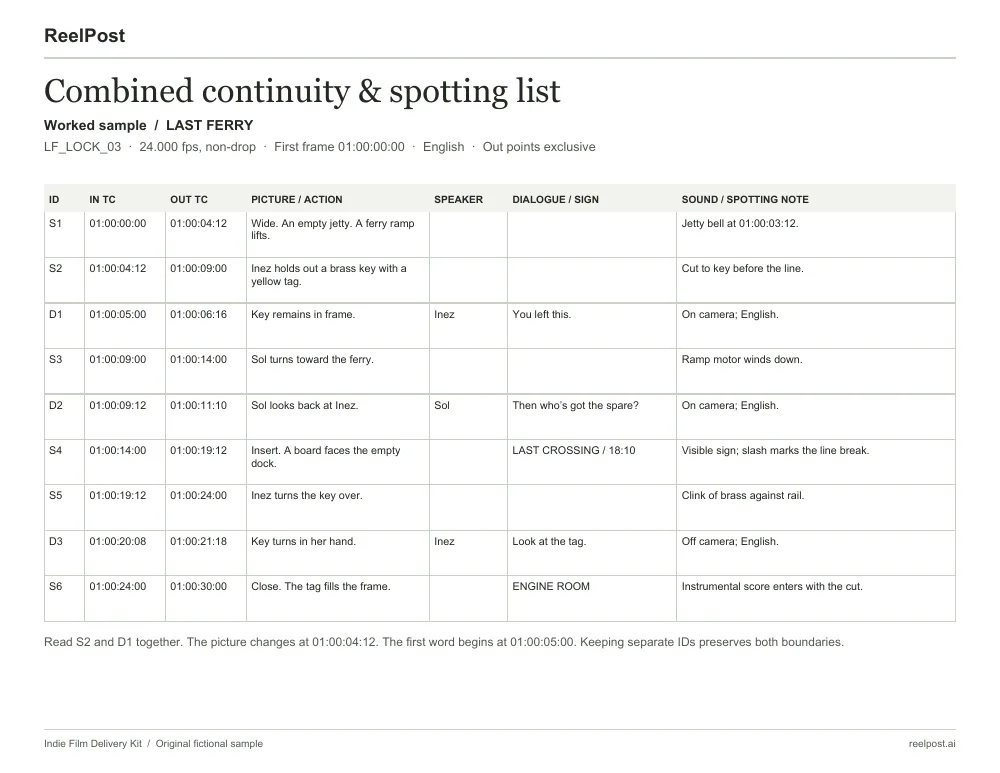
Read one moment across the page
Take a shot of a woman at a platform counter. She glances toward the departures board as a voice behind the camera asks, “Did they change it?” A useful continuity entry identifies the setting, her glance and the visible board. The dialogue entry identifies the speaker as far as the film permits, records the words and supplies an in-point and out-point. A translator can connect “it” to the departure time by seeing the action beside the line.
Some buyers specify much more detail. Sony Pictures’ master and archive specification describes a CCSL that can include cut-by-cut measurements, location and camera information, music starts and stops, and main and end credits. Use the specification supplied with the job to decide which of those items belong in the file. A one-page example approved by the receiver settles many questions about column headings and descriptive detail.
Assemble the reference set
Get the approved locked picture, finished dialogue and a list of character and credit spellings. Record the exact edit version, runtime, frame rate and timecode origin. Ask whether the receiver wants absolute master timecode, reel-relative time, frame counts, footage counts or a combination. An opening frame at 01:00:00:00 can denote the first frame of program; the one-hour label alone does not tell a localization team which origin the timeline uses.
Start from the actual audio. Scripts may contain earlier dialogue, different word order or characters who disappeared in the edit. Use a script as a reference for names and spelling. Resolve uncertain words against the finished mix or an approved dialogue editor, then record the wording that survived into the master.
Decide where the rows change
A shot can contain several speeches. A single line can continue across two cuts. Keep stable identifiers for the shot and the dialogue cue so the document can represent both situations. For a line spoken before a cut but answered afterward, place both events against their own times rather than copying the shot boundary into the end-time column. Preserve useful distinctions between speech in the scene, narration, a television or an offscreen voice.
Check the exported document
Choose a rapid exchange, a long unbroken shot and the final credit roll. Give the document and master to a second editor and ask them to locate those moments from the written information alone. Check that timecode columns stay visible after export and that wrapped text remains aligned with its cue. On a revised cut, keep the old document and identify the first affected shot so the next person can confirm what was reconformed.
For a first delivery, send a short approval extract rather than keeping the recipient waiting for a finished feature. Pick a scene with narration over picture, more than one speaker in a shot and an on-screen graphic. Those three cases exercise the relationships between the columns. Ask the receiving editor whether they can identify the line, its speaker, its context and the exact frames from the extract. Carry their answer into the full document and retain the approved sample with the job sheet.
Questions about this resource
Which instructions apply to my particular delivery?
Confirm the destination, title version and deliverable with the receiving team. Use the linked references and worked example to prepare questions before you send a final file.
Can my team see this workflow on a demo?
Join the ReelPost waitlist with your email and reply to the welcome message. A team member can arrange a walkthrough around the deliverable on your schedule.