What is a spotting list?
A spotting list maps pieces of dialogue or other requested text to the times they occur in a finished film. A subtitle translator can use it to locate a line, identify the speaker and see how much time the line has on screen. The word “spotting” is also used for music and sound effects. Confirm which department ordered the list and what they expect each timed row to contain.
- Cue 087 · 24 fps · In 01:16:03:04 · Out 01:16:05:04, exclusive.
- Ticket clerk, off screen: “You missed it by two minutes.”
- “It” refers to the express train visible departing in the previous shot.
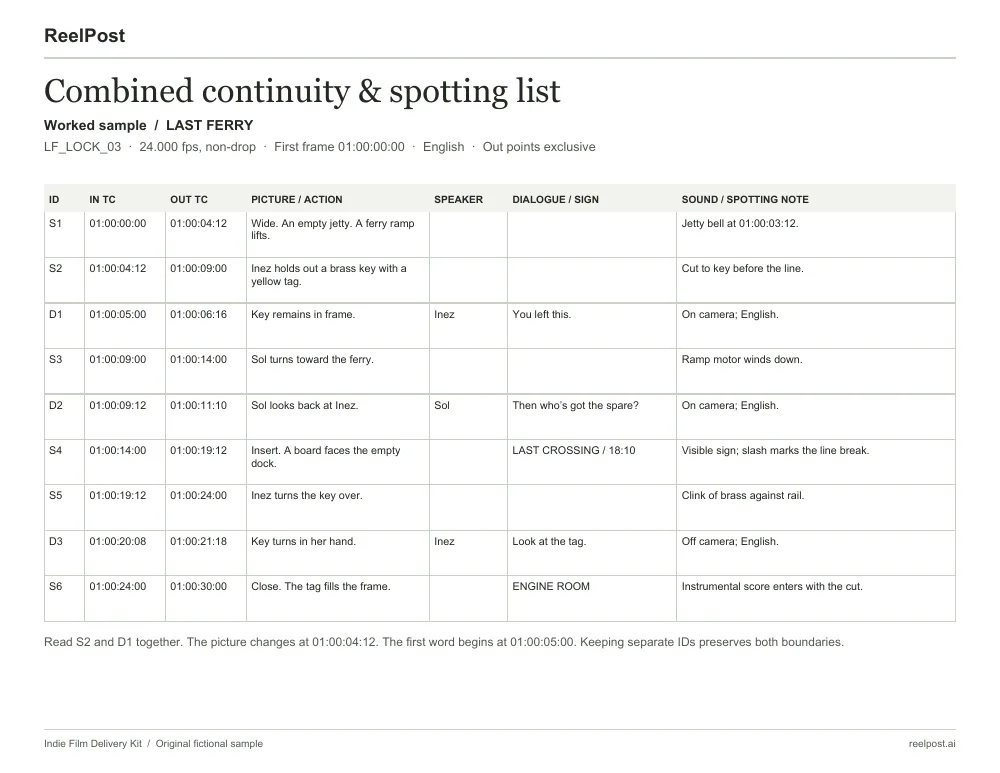
Establish what counts as a spot
Start with a few seconds of actual picture. A character points to a locked gate, asks for the keys and is answered by someone outside the frame. That sequence could produce two dialogue spots and a separate entry for the wording on a warning sign. The picture edit may contain three shots through the same exchange. Give the dialogue cues their own identifiers so their boundaries can follow the speech or intended subtitle exposure.
Ask the localization supervisor whether the list should describe words as spoken, proposed subtitle division, visual inserts, annotations or all of them. Sony Pictures’ archive specification is one example of a buyer giving detailed instructions for language and spotting materials. The accepted sample for the project is a better formatting reference than an unlabeled spreadsheet from another feature.
Put coordinates on every row
Declare the frame rate and timecode origin for the entire document. Identify whether an out-point means the last visible frame or the first frame after the event ends. Add the cut version, creation date and, where appropriate, reel or part number. When the picture contains a leader, determine whether time is measured from the leader, the first frame of program or an embedded master timecode. Record the decision where the recipient will see it.
Some receivers work in frame counts or film footage instead of the clock notation used in an editorial timeline. Ask for the requested units and how reels should reset. Test one short cue by counting frames on the receiving reference. If two people calculate the same duration from the sample, proceed with the full spotting pass.
Give translators the missing context
Copy the line from the finished audio. Add the visible speaker or an approved identifier and note when a voice comes from a device, another room or narration. Write a short annotation when the nearby image explains a pronoun, pun or reference. An observation that “it” refers to the station clock is more useful to a translator than a general summary of the scene.
Flag uncertain words for review with a timecode. Keep unresolved guesses out of the approved dialogue column. This matters when one spot is used across multiple languages. A mistake that starts in the master list can be reproduced in every translation before anyone hears the original line again.
Reconform the list after a new cut
Compare the new master with the version named in the header. Check the first cue, a reference immediately after each changed section and the last cue in the reel. An insert can change every event that follows while leaving the opening in sync. Preserve old identifiers when practical so a translator can tell which completed lines survive. Log the added, removed or moved cues with the replacement date.
A recipient may revise the translation after the original spotting pass. Keep the translated text in its own column or separate file and retain the original cue identifier. If the translator divides one cue into two for reading speed, record which original speech both cues came from. During a later conform this saves an assistant from guessing which of two nearly identical lines survived the picture change.
Questions about this resource
Which instructions apply to my particular delivery?
Confirm the destination, title version and deliverable with the receiving team. Use the linked references and worked example to prepare questions before you send a final file.
Can my team see this workflow on a demo?
Join the ReelPost waitlist with your email and reply to the welcome message. A team member can arrange a walkthrough around the deliverable on your schedule.